
If you are planning to pursue an MBA or PGDM after graduation, XAT 2027 registration is one of the important application processes you should keep on your radar.
The Xavier Aptitude Test (XAT) is conducted by XLRI Jamshedpur on behalf of XAMI members and is accepted by more than 250 business schools. For XAT 2027, the official registration process has already opened, and candidates can complete their applications online through the official XAT website.
But filling out an entrance-exam application form is not something you should rush through.
A small mistake in your name, academic details, photograph, signature, programme preference or test-city selection can create unnecessary problems later. The official XAT registration instructions specifically advise candidates to verify their details carefully before final submission because applicant details cannot be edited after the form is finally submitted after payment.
This guide explains everything you need to know about XAT 2027 registration, including the important dates, eligibility criteria, application fee, documents required, step-by-step registration process, test-city selection and common mistakes to avoid.
Important: XAT registration information can change. The dates and fees mentioned below are based on the official XAT 2027 website available at the time of writing. Always check the official portal before submitting your application.
XAT 2027 Registration: Quick Overview
Here are the key details you should know before starting your application:
| Particular | XAT 2027 Details |
|---|---|
| Exam | Xavier Aptitude Test (XAT) 2027 |
| Conducting body | XLRI Jamshedpur on behalf of XAMI |
| Registration starts | July 15, 2026 |
| Registration deadline | December 6, 2026 |
| Admit card | December 20, 2026 (Tentative) |
| XAT 2027 exam date | January 3, 2027 |
| Exam timing | 2:00 PM to 5:00 PM |
| Registration mode | Online |
| Basic qualification | Bachelor’s degree of at least 3 years |
| XAT registration fee | ₹2,300 |
| Additional XLRI programme fee | ₹200 per programme |
| Preferred test cities | Up to 6 |
The dates above are published on the official XAT 2027 registration page.
Official XAT 2027 Registration Portal
Is XAT 2027 Registration Open?
Yes.
The official XAT website currently lists July 15, 2026 as the registration opening date and December 6, 2026 as the closing date. The XAT 2027 examination is scheduled for January 3, 2027, from 2:00 PM to 5:00 PM.
There is an important distinction for students registering now.
The official website announced an August mock test for candidates who completed their XAT 2027 application by August 27, 2026. Since that date has passed as of August 28, 2026, candidates registering now should not assume that they are eligible for that particular August mock test. However, the main XAT 2027 registration deadline remains December 6, 2026, according to the official schedule.
So, if you haven’t registered yet, you still have time—but there is little benefit in waiting until the final week.
XAT 2027 Registration Dates
The current official schedule is:
| Event | Date |
|---|---|
| Registration begins | July 15, 2026 |
| Registration closes | December 6, 2026 |
| Admit card download | December 20, 2026 (Tentative) |
| XAT 2027 examination | January 3, 2027 |
| Exam timing | 2:00 PM–5:00 PM |
The admit-card date is specifically marked tentative by the official website, so candidates should check the official portal for the final announcement.
Should you wait until December to register?
No.
Even though December 6 is the official deadline, early registration gives you more time to:
- Check your application details
- Resolve payment problems
- Correct issues before final submission
- Plan your preferred test cities
- Focus on XAT preparation instead of paperwork
There is generally no advantage to creating unnecessary last-minute pressure.
Who Can Apply for XAT 2027?
According to the official XAT 2027 FAQ, candidates need a recognized Bachelor’s degree of at least three years’ duration or an equivalent qualification in any discipline. Candidates appearing for their final examinations by June 12, 2027, are also eligible to apply.
This means your undergraduate background does not have to be limited to a particular stream.
For example, students with degrees in areas such as:
- Engineering
- Commerce
- Arts
- Science
- Management
- Humanities
may be eligible, provided they meet the applicable degree requirements.
What if you are in your final year?
Final-year candidates can apply if they meet the official condition regarding completion of their final examinations by June 12, 2027.
However, don’t enter your academic status casually. Use the information that accurately reflects your current situation.
Is Work Experience Required for XAT 2027?
No mandatory prior work experience is specified for applying to XAT 2027.
The official FAQ also clarifies that internships and articleships are not counted as work experience for the relevant XAT application purpose. Work experience considered is full-time experience gained after graduation.
Therefore, a fresher should not assume that they cannot take XAT simply because they have never worked full-time.
XAT 2027 Registration Fee
The official XAT 2027 registration page lists the following fees:
| Applicant / Requirement | Fee |
|---|---|
| XAT registration | ₹2,300 |
| Each additional XLRI programme | ₹200 |
| Indian candidates applying for PGDM (GM) through GMAT/GRE | ₹2,600 |
| NRI/Foreign/PIO/OCI candidates applying through GMAT | ₹5,000 |
The exact amount you pay depends on the programmes and route you select.
Important distinction
Registering for XAT and applying for a particular XLRI programme are not necessarily the same thing.
The official FAQ states that registering for XAT does not automatically make you eligible for every XLRI or participating-institute programme. Candidates need to apply separately for the XLRI programmes they want.
This is an important point that many first-time applicants overlook.
Documents Required for XAT 2027 Registration
Before beginning the form, keep your important information and digital files ready.
The official registration instructions specifically require candidates to upload a photograph and signature according to the prescribed specifications.
You should generally keep the following information/documents accessible:
- Recent passport-size colour photograph
- Scanned signature
- Graduation details
- Academic records
- Work-experience details, if applicable
- Valid email address
- Mobile number
- Payment method
- Programme preferences
- Preferred test-city choices
Photograph requirements
The official instructions say the photograph should be a recent passport-size colour photograph.
Candidates should:
- Look directly at the camera
- Avoid harsh shadows
- Ensure the face is clearly visible
- Avoid dark glasses
- Avoid caps or hats
- Ensure there is no distracting reflection on spectacles
Religious headwear is permitted provided it does not cover the face. The official registration page also specifies file-size and image-format requirements.
Signature requirements
Your signature should be made by you, on white paper with a black ink pen.
The signature uploaded during registration should match the signature used on the admit card and attendance sheet. A mismatch can create a serious problem, so don’t upload somebody else’s signature or an unclear image.
How to Register for XAT 2027
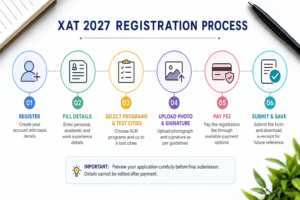
The application process can be completed online.
Here’s the process in simple steps.
Step 1: Visit the Official XAT Website
Start from the official XAT website rather than an unofficial registration link.
Look for the XAT 2027 registration/sign-up option.
Step 2: Create Your Account
Enter the required basic information such as:
- Name
- Email address
- Mobile number
- Password
The official FAQ states that after registration, candidates receive a verification email and need to verify their email address before proceeding.
Use an email address and mobile number that you regularly check.
Don’t use an email account that you rarely open because important XAT communication may be sent there.
Step 3: Verify Your Email
After submitting the initial registration information, check your email.
If the verification message doesn’t appear in your inbox:
- Check your spam folder.
- Check your junk folder.
- Verify that you entered the correct email address.
- Follow the official support process if you still don’t receive the message.
The official FAQ specifically recommends checking spam or junk folders when the registration confirmation email isn’t received.
Step 4: Complete Your Personal Details
Now enter your personal information carefully.
This is one of the stages where you should slow down.
Your name and your parents’ names should match the spelling appearing on your official documents such as certificates, marksheets and identity proof.
The official registration instructions warn that incorrect or altered details can create problems with candidature.
Our advice:
Before moving ahead, compare your entries with your official documents.
Don’t rely on memory.
Step 5: Enter Academic Details
The next stage requires your academic information.
Enter your education details accurately.
Depending on your situation, you may need information relating to:
- Class 10
- Class 12
- Graduation
- Graduation status
- Institution
- Marks/percentage
- Passing year
- Work experience
If you are currently completing your degree, select the appropriate status rather than entering a future qualification as already completed.
Step 6: Enter Work-Experience Details
If you have full-time work experience after graduation, enter the relevant information.
If you’re a fresher, don’t try to artificially convert internships or college projects into work experience.
The official FAQ explicitly says that internship or articleship experience is not treated as work experience for this purpose.
Accuracy is more important than trying to make your profile look more experienced.
Step 7: Select XLRI Programmes
If you want to apply to XLRI programmes, select your programme preferences during the application process.
The official registration instructions specifically include a step where candidates can select their preferred XLRI programme.
Read the programme names carefully before selecting them.
Don’t select an option simply because it says “XLRI.”
Understand which programme you’re applying for and whether it matches your career goals.
Step 8: Select Your XAT Test Cities
Candidates can choose up to six preferred test cities during registration.
The official instructions recommend selecting cities close to your place of residence, although the final authority for test-centre allotment remains with the examination authority.
How should you choose?
If your preferred city is available, consider:
- Distance from home
- Travel convenience
- Availability of transportation
- Familiarity with the city
- Backup options
Don’t select six cities randomly.
Your choices should reflect where you can realistically travel for the examination.
Step 9: Upload Photograph and Signature
Upload the photograph and signature according to the official specifications.
Before uploading, check:
- Is the photograph recent?
- Is your face clearly visible?
- Is the image clear?
- Is the signature readable?
- Are the file sizes within the prescribed limits?
- Is the file format acceptable?
The official page says that JPG, JPEG and PNG formats can be used for the image files and provides specific size instructions.
If the system rejects an image, don’t repeatedly upload the same file.
Resize or rescan it according to the official requirements.
Step 10: Preview the Entire Application
This is one of the most important steps.
Before final submission, carefully review your complete form.
Check:
- Name
- Date of birth
- Parent details
- Mobile number
- Academic information
- Work experience
- Programme selection
- Test cities
- Photograph
- Signature
The official XAT registration instructions explicitly tell candidates to preview and verify the complete application before submitting it.
Don’t rush this step.
Spend a few extra minutes here.
They can save you a lot of trouble later.
Step 11: Submit and Pay the Application Fee
Once you’ve checked everything, proceed to payment.
The official XAT registration page says that the application form is integrated with the payment gateway and supports several payment methods, including cards, internet banking, IMPS and mobile wallets.
During payment:
Do not repeatedly refresh or press the back button.
The official instructions specifically warn candidates to wait for the server response to avoid problems such as duplicate payments.
Step 12: Save Your Confirmation
After successful payment, an e-receipt should be generated.
Save:
- Payment receipt
- Application form
- Registration details
- Login credentials
- Confirmation email
The official instructions recommend downloading or printing the e-receipt and online application form.
It is better to keep both a digital copy and a backup.
Create a folder on your computer specifically for XAT 2027 documents.
Can You Edit the XAT 2027 Application After Submission?
This is something you should take seriously.
The official registration instructions state that candidates should verify all details before final submission and that applicant details cannot be edited once the application has been submitted after payment.
So don’t think:
“I’ll submit now and correct it later.”
That can be risky.
Instead:
Fill → Preview → Check → Recheck → Submit → Pay
Take your time before clicking the final submission button.
Common Mistakes to Avoid During XAT Registration
1. Waiting Until the Last Day
Technical issues, payment failures or forgotten documents can create unnecessary stress.
Register well before December 6.
2. Entering Your Name Incorrectly
Use the spelling from your official documents.
3. Uploading an Incorrect Photograph
Make sure your photograph follows the current specifications.
4. Uploading Someone Else’s Signature
The signature must belong to the applicant.
5. Choosing Test Cities Randomly
Choose practical locations and remember that final allotment rests with the authority.
6. Ignoring XLRI Programme Selection
XAT registration does not automatically mean you’ve applied to every XLRI programme.
7. Not Saving the Payment Receipt
Always save your e-receipt and application form.
8. Assuming an Internship Is Work Experience
The official FAQ clearly distinguishes internship/articleship from qualifying full-time work experience.
9. Using an Inactive Email Address
Your registered email should be one you check regularly.
XAT 2027 Registration Checklist
Before submitting your application, use this checklist:
- I meet the XAT 2027 eligibility criteria.
- I have checked the official registration deadline.
- My name matches my official documents.
- My parent’s details are correct.
- My email address is active.
- My mobile number is correct.
- My academic details are accurate.
- My work-experience details are accurate.
- I have selected the correct XLRI programme preferences.
- I have selected up to six practical test-city preferences.
- My photograph meets the requirements.
- My signature meets the requirements.
- I have previewed the complete form.
- I have checked the fee amount.
- I have completed payment successfully.
- I have downloaded the e-receipt.
- I have saved the application form.
- I have saved my login details.
What Should You Do After XAT 2027 Registration?
Registration is only the first step.
Once your application is complete, your main focus should shift to preparation.
XAT is not simply another MBA entrance exam where you can depend entirely on memorising formulas. The examination is known for testing aptitude, reasoning and decision-making abilities, so consistent practice matters.
After registering, create a preparation plan around:
- Quantitative Ability
- Verbal and Logical Ability
- Decision Making
- General Knowledge
- Mock tests
- Time management
- Previous-year papers
Don’t wait for the admit card before taking preparation seriously.
Your registration gives you a confirmed opportunity to appear. Your preparation determines what you do with that opportunity.
Frequently Asked Questions About XAT 2027 Registration
When does XAT 2027 registration start?
XAT 2027 registration opened on July 15, 2026, according to the official XAT website.
What is the last date to register for XAT 2027?
The current official deadline is December 6, 2026.
What is the XAT 2027 registration fee?
The standard XAT 2027 registration fee is ₹2,300. Candidates applying to XLRI programmes pay an additional ₹200 per programme.
Can final-year students apply for XAT 2027?
Yes. Candidates completing their final examinations by June 12, 2027 are eligible according to the official XAT 2027 FAQ.
Is work experience compulsory for XAT?
No. The official eligibility information does not require prior full-time work experience for XAT 2027.
How many test cities can I choose?
You can select up to six preferred test cities during the XAT application process. Final allotment is determined by the examination authority.
Can I edit my application after final submission?
The official registration instructions state that applicant details cannot be edited once the application has been submitted after payment. This is why you should carefully review the form before final submission.
Does XAT registration automatically apply me to XLRI?
No. The official FAQ says candidates need to apply separately for the XLRI programmes they want.
What is the XAT 2027 exam date?
The official website currently lists January 3, 2027, from 2:00 PM to 5:00 PM as the XAT 2027 examination date and timing.
Final Takeaway
The XAT 2027 registration process is straightforward, but it deserves your attention.
The biggest mistake is treating the application form as something you can complete casually in ten minutes.
Keep your documents ready, use the official website, enter your details exactly as they appear on your records, choose your test cities carefully and review everything before final submission.
For XAT 2027, registration opened on July 15, 2026, and the current official deadline is December 6, 2026. The examination is scheduled for January 3, 2027, from 2:00 PM to 5:00 PM.
And remember one important distinction:
Registering for XAT is not the same as completing every XLRI programme application.
If XLRI is one of your target institutions, check the programme options carefully while completing your form.
Most importantly, don’t leave registration until the last moment. Once your application is submitted and payment is completed, the official instructions say applicant details cannot be edited.
After you’ve successfully registered, shift your attention to the part that matters even more:
preparing to perform well on XAT 2027.
Check XAT 2027 Registration on the Official Website
Quick XAT 2027 Reminder
Registration: July 15–December 6, 2026
Admit Card: December 20, 2026 (tentative)
Exam: January 3, 2027
Time: 2:00 PM–5:00 PM
Registration Fee: ₹2,300
XLRI Programme Fee: ₹200 per programme
Basic Eligibility: Bachelor’s degree of at least 3 years / eligible final-year candidates.
Information verified against the official XAT 2027 website on August 28, 2026. Candidates should check the official portal for any subsequent updates before submitting the application.



1 Comment on this Guide